

About VIS
VIS, Business Information System, is a technical platform based on Qlikview software. The function is to read data from various source systems and make the information available through reports (applications) displayed via a web interface.
Login
Log in with your regular user name and KI-ID and password you use when log in to other KI systems.
If you have recently acquired a new computer and/or use a PIN code or facial recognition, you will need to log in in a specific manner the first time you use VIS. For instructions, please refer to the quick guide below.
What is VIS and how is it used?
To create reports containing information from different systems, you traditionally have to go in and retrieve the information you are interested in from the systems and manually compile the information in, for example, Excel. VIS acts as a report generator that retrieves the information you are interested in from the source systems and presents the content in applications set up the way you want. The ability to link several different source systems to the application makes it possible to automatically obtain highly informative data that would otherwise have taken time to compile manually. In other words, all information found in VIS is a reflection of information found in other systems.
The source systems linked to VIS are Ladok, Primula, UBW and bibliometrics.
Authorisation
If you are responsible for staff or have a research project, you will automatically be given access to the staff application and Forskarvy. You do not need to apply for authorisation.
To gain access to other applications in VIS, an application form must be completed and approved by AC or the head of department. The completed form is then emailed to vis@ki.se, who will ensure that the authorisation is added. The application form can be found at the bottom of the page under ‘Documents’.
Login instructions
If you have recently acquired a new computer and/or use a PIN code or facial recognition, you will need to log in in a specific manner the first time you use VIS. For instructions, please refer to the quick guide at the bottom of the page under ‘Documents’.
- Log in to https://vis.ki.se/
- Click on “Fler alternativ” meaning More options” (see red circle below)
- Then click on “Använd ett annat konto meaning Use another account” (see red circle below)
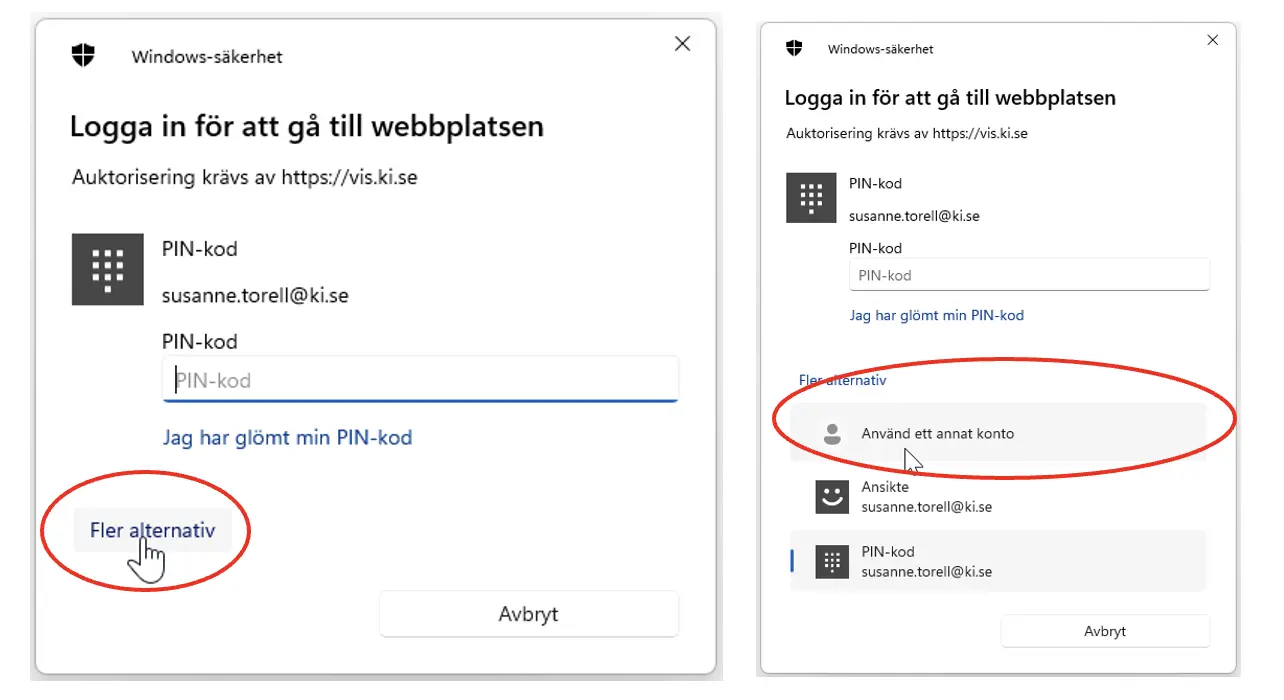
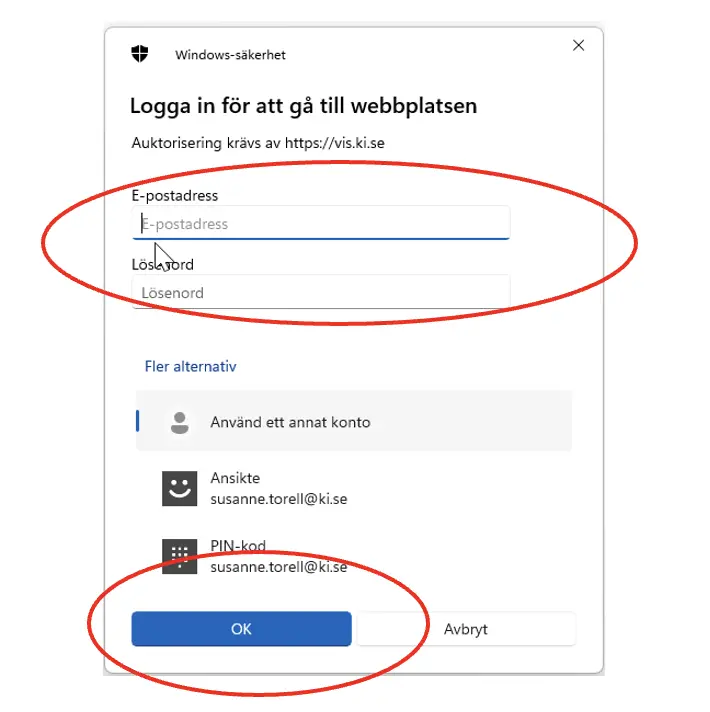
- 4.In the field labeled “E-postadress” meaning Email address” (see red circle below), enter your KI-ID instead of your email address. Note: The login box incorrectly states that you should enter your email address.
- In the ‘Password’ field, enter your usual password
- Continue by clicking the OK button
- You are now logged in to VIS
Introduktion till VIS
Questions, suggestions or support
Contact VIS
If you have a question about the content of an application, please email vis@ki.se.