

REDCap support and resources
Here you can find information on where to get help with REDCap related questions and inquiries. We have also gathered useful REDCap resources (videos, user guides and instrument libraries) below.
Project creation and management
Most requests related to your day-to-day work in REDCap will be sent automatically to your REDCap administrator, e.g.
- Create a new project
- Copy/delete projects
- Some draft changes in Production mode
- Create an API token

IT related questions or incidents
IT related issues in REDCap should be addressed to the KI Self-service webpage.
- Click on "Create helpdesk ticket"
- Log in with your KI ID and password
- Choose Main category "Research tools"
- Choose "Subcategory" REDCap
Support within the REDCap system
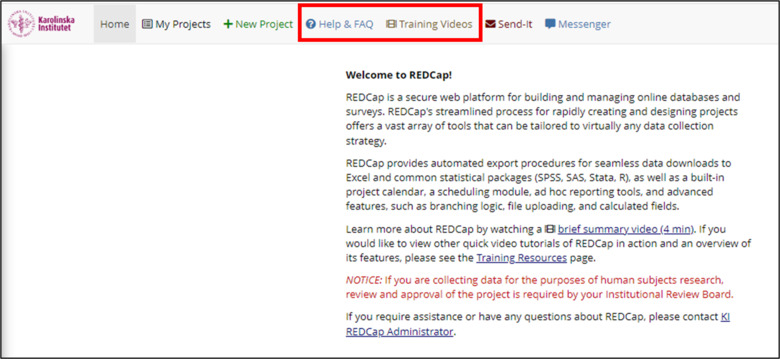
When logged into REDCap at KI you can always click on the buttons "Help & FAQs" and "training videos" on the top to access the respective resources.
REDCap support: Book a Teams meeting
You can book a one-on-one meeting with a REDCap administrator. Our meetings focus on three different types of support:
- You have a specific problem with an ongoing project: You are actively working in a REDCap project and are unable to solve a specific problem yourself. You have tried to fix the problem by looking up resources on this page as well as online but have not been successful.
- You are planning to set up a new study in REDCap and want to discuss your project flow: Knowing how participants will move through your study (i.e. having a study protocol) before starting to build your REDCap project makes working in REDCap significantly easier and faster. Book this meeting if you want to discuss the project flow for your new study. We will not work hands-on but will discuss REDCap settings that are relevant for your study setup so you know what to work with when you start building your project.
- You want to review your project before moving it to Production: Book this meeting if you have built and thoroughly tested your project and believe you are ready to start collecting data. While we cannot look at your project and guarantee that everything works as intended, we can help you look over your project in case we have any last tips or feedback before moving it to Production. Note: These meetings are not a replacement for thoroughly testing your project settings by adding test data.
Meetings can be booked via our Microsoft bookings tool. For all meetings, you are expected to have access to REDCap and to have familiarized yourself with the wide range of public support material so that you at least have a basic idea of what REDCap looks like and how it is structured.
REDCap Workshops
We now offer regular REDCap workshops which aim to provide a basic understanding of REDCap. The workshop series is held at least once every term and currently includes two sessions:
Workshop 1: REDCap Basics: This workshop is suited for anyone with little or no previous experience in building projects within REDCap. We will cover theory, creating a new project, basic project setup, collecting data, user rights, and data export. We will not be able to answer questions about your specific project during the demonstration; however, general questions are welcome.
Workshop 2: Advanced REDCap: This workshop is suited for anyone with some experience in working with REDCap and will focus on more advanced settings. We will cover survey settings, branching logic, survey distribution, email settings and invitations, automated survey invitations, longitudinal data collection, survey translations, and e-consent.
You can book onto our REDCap workshops via the Microsoft bookings tool. Note that these workshops are for KI-staff only and you need to register with your KI email address to be able to access the Teams link.
Connect with other REDCap users on Teams
We have created a Teams Channel (Join Team here) where REDCap users at KI can find each other and exchange knowledge and tips. This team is not moderated by REDCap administrators. REDCap users may connect with each other, create posts and help one another.
Tip: activate notifications for the team/channel after joining so that you get notifications when questions/answers are posted.