

Manage your profile information in KI RIMS
Here is an overview of how to update your profile information in KI RIMS – from your name, photo and contact details to information about yourself, your research and your teaching.
Please note that if you are a research group leader, you need to work both with the information about you as a person (as described on this page) and manage the information about your research group in KI RIMS.
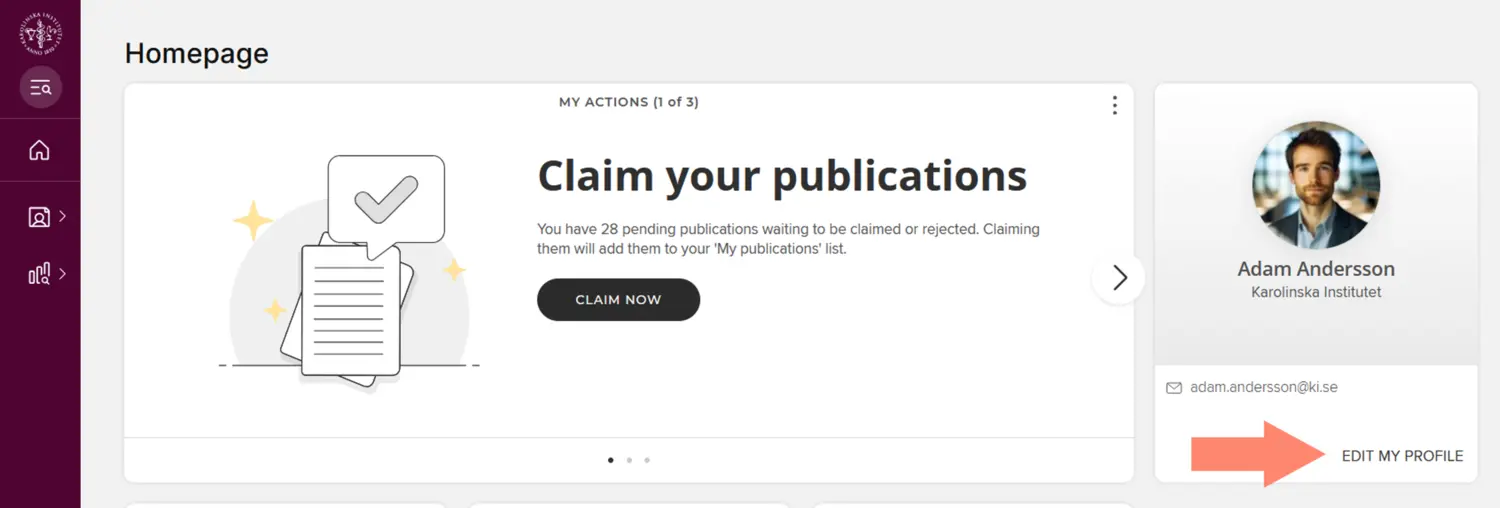
You can access the edit mode, where you edit most of your profile information (as described on this page), by clicking on the Edit my profile link below your profile picture in KI RIMS. The exception is your contact details and organisational affiliation, as these are retrieved from other systems.
Name, group affiliation and contact details
Most of the information in the box at the top of your profile page on ki.se is retrieved once a day from KI’s identity and authorisation system, IDAC, which in turn retrieves information from Primula and UBW Anknutna. In most cases, you cannot edit this information yourself but will need to contact your department's IDAC administrator if you need help changing your information in IDAC.
Name
Even if your name is retrieved from IDAC, you can change the name displayed on your profile page on the Edit my profile page in KI RIMS by clicking on the Account settings page and entering information in the Preferred name fields. A detailed description can be found on the Account settings in KI RIMS page.
Group affiliation
If your groups are not displayed correctly under the Part of heading, it is best to speak to your group leader/manager, who can either add or remove you from the group page or help arrange for you to be formally assigned to the groups you belong to.
Contact details
The only contact detail you can edit directly on the Edit my profile page in KI RIMS is the alternative email address, which you can use if you wish to add an email address other than your ki.se address. In IDAC, you can change your visiting address yourself or choose whether your mobile number should be visible on your profile page on ki.se:
- How to change visiting address, short video in KI PLAY
- Change cell phone visibility at intranet / KI-web, short video in KI PLAY
Telephone numbers
Phone numbers and mobile numbers on the profile pages on ki.se come directly from Telia (TPP) via IDAC and KI RIMS for those who have a KI phone. If your phone number does not appear as it should, you need to contact the telephony administrator at your department. It is not possible to change, add or delete phone numbers in KI RIMS or IDAC.
Mobile phone numbers are only displayed for those who have actively unchecked Hide Cell phone in IDAC.
The only phone numbers that can be found in KI RIMS/profile page without being in TPP are the mobile numbers retrieved from UBW affiliates. If you need to change your mobile number there, please contact your UBW Affiliates administrator at your department.
Photo of you
You should add a portrait photo unless you have personal reasons not to do so.
When uploading an image, it helps if you first crop it to a square. Also make sure that:
- the photo depicts you
- your face is centred in the image
- you have permission to use the photo
- the size of the photo is a maximum of 6.3 MB and in one of the formats .jpeg, .jpg or .png.
- you have the image saved so you can access it from your computer.
Click the Upload a photo button, select your image and click Save without zooming or cropping the image further.
Here are some tips on how to take a good self-portrait with your phone.
Information about yourself under ‘About’
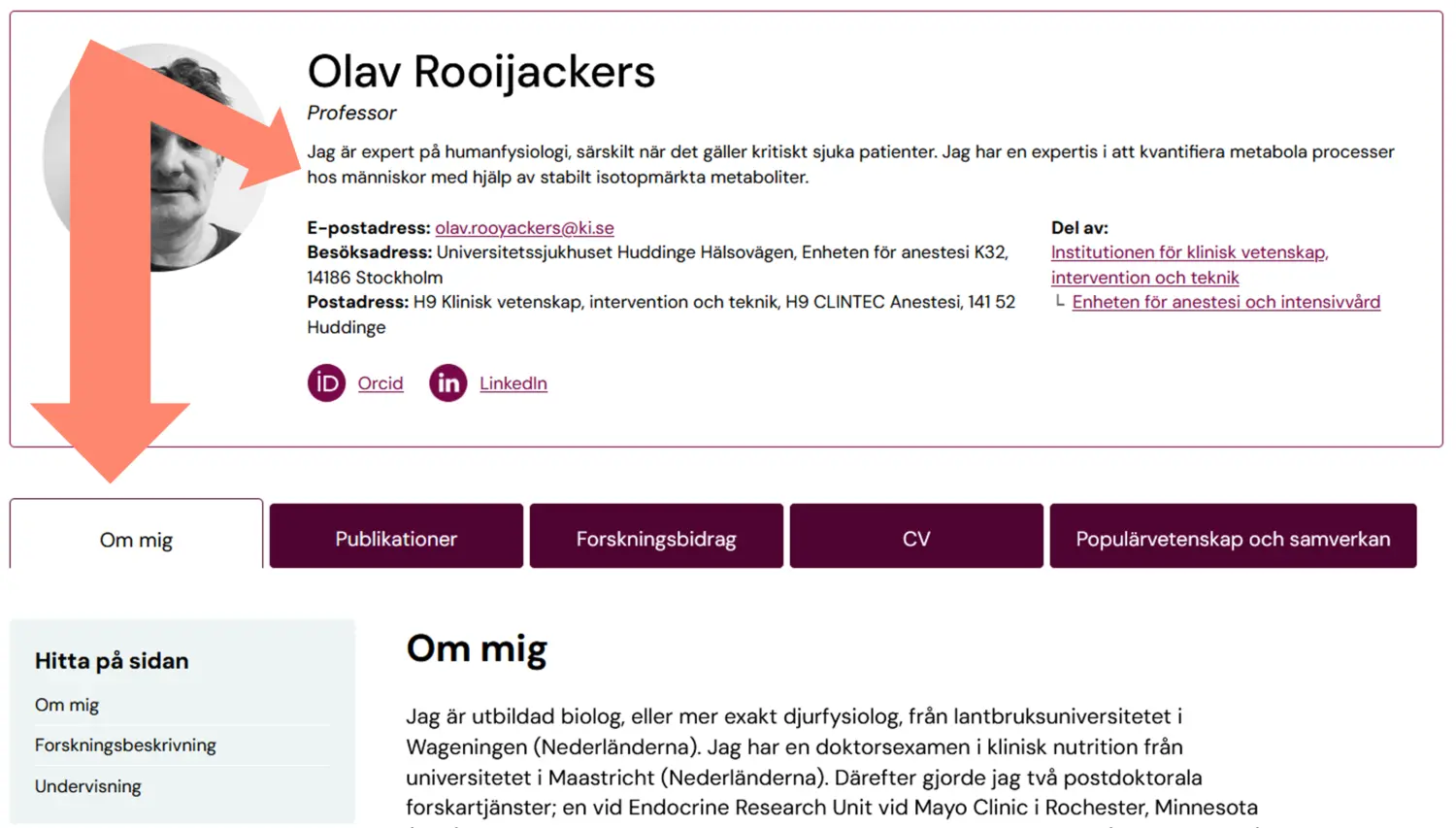
Under ‘About’ on the ‘Edit my profile’ page, there are four different types of text fields where you can add information about yourself. You only need to fill in the fields that are relevant to your work, and only the fields you choose to fill in will appear on your profile page on ki.se. The content of the first three fields is displayed on the ‘About me’ tab, whilst text in the ‘Summary’ field is displayed directly in the contact card
Please note that the fields have both an English and a Swedish version where information must be entered, as ki.se is a bilingual website.
- Overview - Here you can add general information about yourself and your work at KI, regardless of your position.
- Research interests - Here you can describe your research.
- Teaching summary - Here you can add information about your teaching qualifications and your teaching activities.
- Summary - Here you can add a brief summary about yourself. This text will appear under your title, in employee lists, and can also be used by editors in contact cards.
If you want to copy text from, for example, Word, you first need to "clean" the text from code. Either by copying the text, right-clicking and selecting Paste as plain text or by first pasting it into Notepad or similar plain text programme.
You can now format the text under About with links, bullet points and more.
How to write about yourself, your research and your teaching as a researcher
Your profile page on ki.se is often the first result when someone searches for your name – both internally and externally, including searches via search engines and AI services. How you write the text under the About me tab affects both your chances of being found and of being understood by the visitor (and, ideally, chosen).
Start with the most important information; two or three sentences are often enough and remember to use words and terms that your target audience would actually search for (for example, method, diagnosis/field, research focus, course name, role). To ensure that visitors are able to quickly understand and feel trust, write clearly and plainly: what you do, for whom, why it matters, and how you can be contacted or collaborate.
If you wish to list your various qualifications in more detail, you can do so in the Professional activities module in KI RIMS; these will then appear under the CV tab on your profile page.
Use AI to help you draft your texts
It could be helpful to use a tool like Copilot to create a first draft of your texts for your profile page. In the expandable instructions below, we have included suggested prompts that you can use alongside an existing CV or bio.
Remember to always read through your texts carefully before publishing them and check that:
- all facts are correct
- no details are missing
- the text accurately reflects your role and your research.
You may also find it convenient to use AI to translate the finished text into English – just do not forget to proofread that text as well before you publish it on your profile page.
In this section, write a brief summary about yourself in the first person. Give a short description your role at Karolinska Institutet, including yourfield of work, and journey to KI.
Example
I am a professor of biochemistry at Karolinska Institutet since 1867, leading the research group in Biochemical Medicine. I completed my PhD in 1837 at Harvard and later conducted my postdoctoral research at Cambridge. Since 1903, I have led the EU collaborative project 'ComeTogetherBiochemistry,' CTB.
Throughout my career as a researcher, I have achieved [mention some of your accomplishments or projects, such as major awards or collaborations with other researchers].
Suggested prompt for AI (Copilot)
Please write a short text about me in the first person for my KI profile. The text should be personal yet professional and summarise my role at Karolinska Institutet, my field of research and my background.
It should include:
- My title and role at Karolinska Institutet
- My field of research, area of expertise or work description
- My career path (e.g. education, postdoc, previous departments)
- Some key achievements, assignments or collaborations
The style should be concise, simple and informative – approximately 3–5 sentences. Use a clear and neutral tone appropriate for a researcher’s profile.
Please note that Karolinska Institutet is written with a capital ‘I’.
Please then ask me for any missing details so that I can write a complete text.
Describe your research at KI.
Example
My research area is [Your research area], where I focus on [brief description of your specific research interest].
My research aims to [describe the overarching goal of your research, e.g., understanding mechanisms behind a certain disease, developing new treatment methods]. By [describe your methodology or approach, e.g., using advanced techniques, collaborating with other researchers], I hope to contribute to [describe the broader goal or vision for your work, e.g., improving patients' quality of life, enhancing our understanding of biological processes].
Suggested prompt for AI (Copilot)
Write a text for my KI profile that describes my research. The text should be factual, easy to read and suitable for a wide audience, approximately 5–7 sentences long.
It should include:
- My general field of research
- My specific research focus
- The purpose or aim of my research
- A brief description of the methods, models or approaches I use
- The long-term benefits or knowledge the research aims to contribute to
The style should be clear and non-technical, yet accurate.
Please note that Karolinska Institutet is written with a capital ‘I’.
Please then ask me for any missing details so that I can write a complete text.
Summarise your teaching experience.
Example
I am the course coordinator for the biochemical medicine course in the study programme in medicine. I have supervised 16 PhD students to the defence of their thesis. I am a regular lecturer at patient associations and other organisations.
Suggested prompt for AI (Copilot)
Please write a short text for my KI profile summarising my teaching experience. The text should be brief, concise and professional, approximately 3–5 sentences long.
It should include:
- The courses I teach or am responsible for
- Any supervisory responsibilities (PhD students, Master’s students, etc.
- Other teaching-related activities (lectures, workshops, courses outside Karolinska Institutet)
Adapt the text so that it is easy to understand even for visitors outside the academy.
Please note that Karolinska Institutet is written with a capital ‘I’.
Please then ask me for any missing details so that I can write a complete text.
Add a short summary about yourself. The text will appear under your title, in employee lists, and can be used in contact cards.
- Keep the text short and informative (max 200 characters).
- Describe your role, expertise, or area of work.
Examples
- Conducts research on immunotherapy and cellular mechanisms
- Specialised in clinical trials and patient data analysis
How to describe your role at KI if you are not a researcher
Even if you hold an technical/administrative position, you should add information to your profile page about what you do at KI. This makes it easier for anyone wishing to get in touch with the right expertise or find the right person. Usually, a few sentences under About me are sufficient, which can be supplemented by, or in some cases even replaced by, an even shorter text in the Summary field that appears directly on your contact card on ki.se.
A short text describing what you do, written in the first person. Keep it straightforward when describing your role.
Example
I work as [your role] at [department]. My role involves [describe your tasks, ideally in a bullet list if it includes several responsibilities].
Add a short summary about yourself. The text will appear under your title, in employee lists, and can be used in contact cards.
- Keep the text short and informative (max 200 characters).
- Describe your role, expertise, or area of work.
Example
- Coordinates training programs and digital learning platforms
Describe your research with Labels
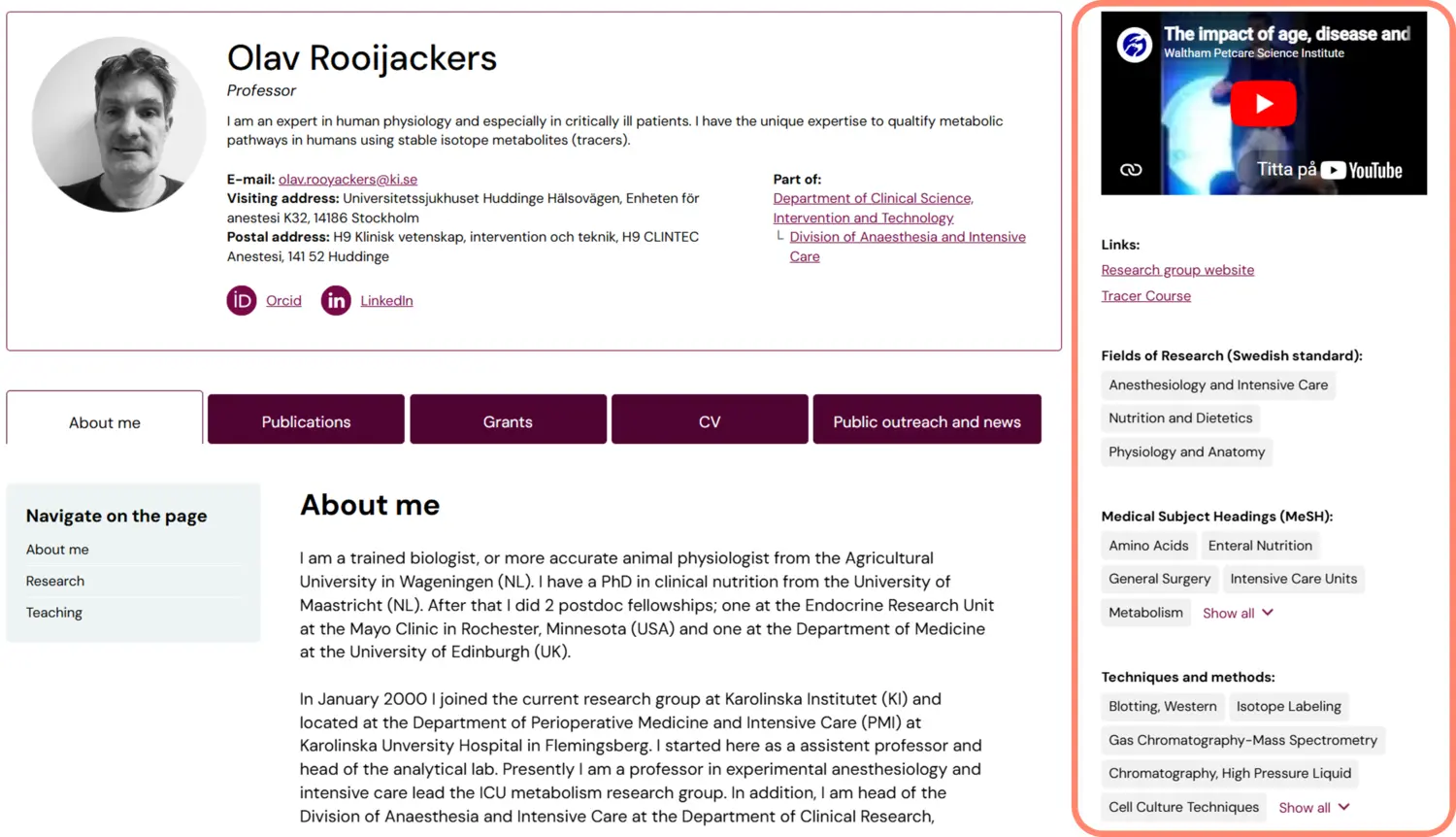
Under the heading Labels, you can describe your research activities using labels from the fixed vocabularies listed below. The labels will appear in the right-hand margin of your public profile page. You only need to add Labels in English; they will automatically appear in both languages on ki.se.
Click Manage labels to search and add the keywords that fit your research.
- MeSH - here you can choose NLM’s medical subject headings to describe your research..
- Swedish standard for fields of research - the research fields that you have chosen to describe your research with in the bibliometric system are shown here. If you want to add a research field, you preferably do this in the bibliometric system, but it is also possible to add labels only in KI RIMS if you consider them less relevant for bibliometric analyses. If you want to remove a research field, you need to remove it in both the bibliometric system and KI RIMS.
- Techniques, Methods, and Equipment - If you have developed or are particularly skilled in a certain method, technique, etc. you can display it by using a topic from NLM here.
Links to websites and social media sites
Under the heading Addresses, you can add links to relevant websites that you want to show on ki.se.
When you add a new link under +Add web address, you have several link types to choose from under Type. Select Other if you cannot find one that fits. In the Label field, type a link text. This is the text that will be displayed in the right-hand column on your profile page on ki.se. You can only write in one language, so picking English is preferable if you want to display the links on your public profile page.
Some links you add will automatically appear as icons in your contact details on your ki.se. This applies to:
- Google scholar
- Research gate
- X (Twitter)
Video
Under the heading Media, you can add links to YouTube videos that will appear embedded at the top of the right-hand column on your ki.se profile page. Use the label field to set a title for your movie. For purposes of accessibility, it is important that you add a description of what the video contains.
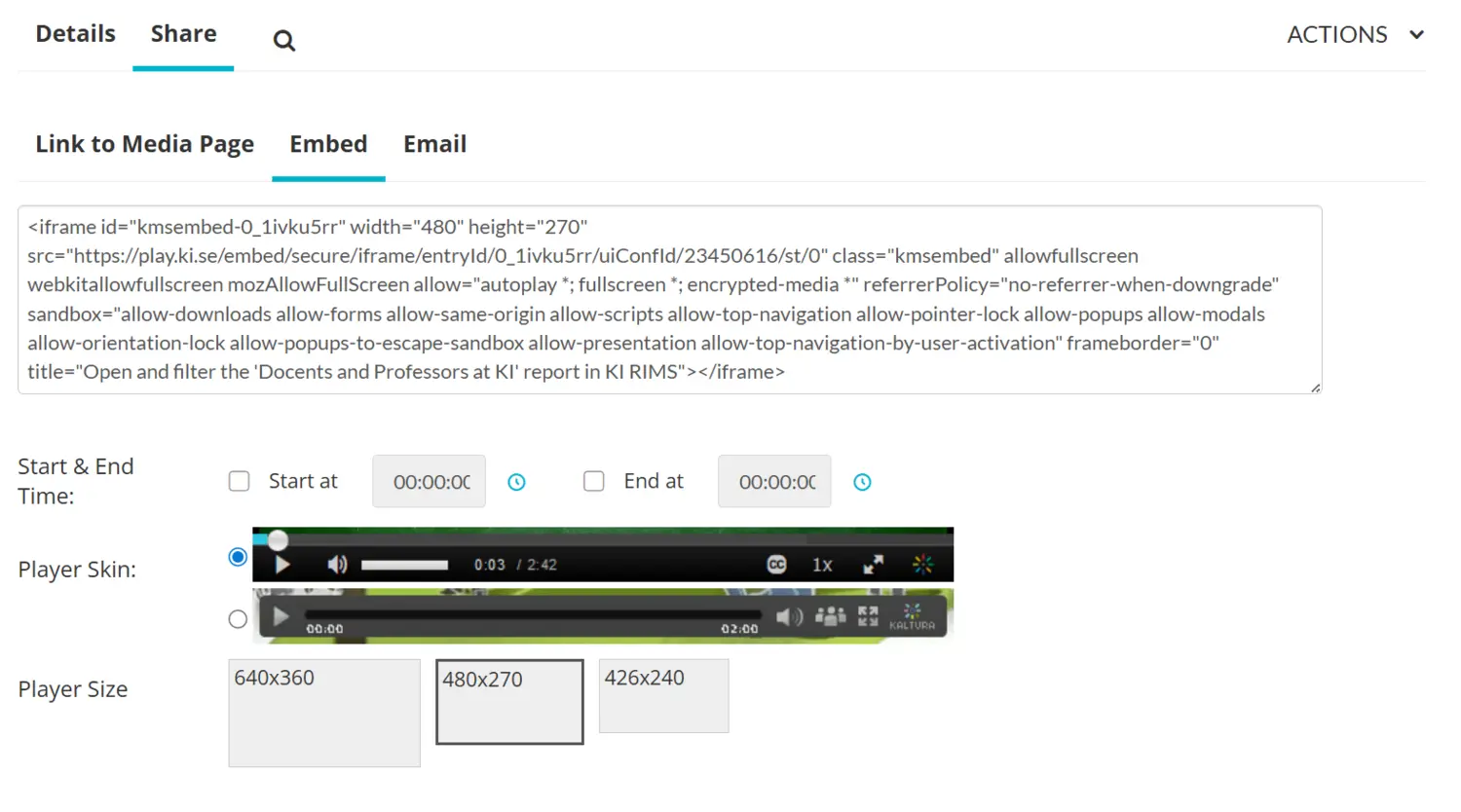
If you want to embed a video that is not on YouTube, for example from KI Play, go to the Publications module in KI RIMS, create a publication of the type Media (audio-visual) and paste the embed code into the Embedded video URL field. In KI Play, you will find the embed code under the heading Embed.
Changes are fetched frequently
ki.se automatically retrieves information from KI RIMS when it is changed there. Most changes take effect quickly, but due to cache times between all systems, it can take up to an hour, depending on when you make the change.